Samsung One UI 4.0 Feature details :

Like many Manufacturers samsung also used to develop and Provide it's Custom OS which is called as One UI. After Google releasing it's developer builds samsung develops it's customer ROM based on latest android version like the same google now comes to upgrade their qualified devices with One UI 4.0 based on Android 12, Let us see what samsung offers to it's users (Some Pictures used in this may be taken from Samsung's official site for better understanding the topic) :
We have already discussed about Android 12 features if anyone didn't checked the same go through this link and check it out because we are covering main changes which Samsung mentioned and we observed particularly.

Theming and Color Palette :
As part of Android 12 update, Android brings color palettes and customized theming option like the same samsung also brings color palette which is based on your wallpaper, Samsung used this feature and they developed as if a user sets a desired color tone, the AI recommends colors that best match the wallpaper. You can also change the same by trying new colors.

Widgets :
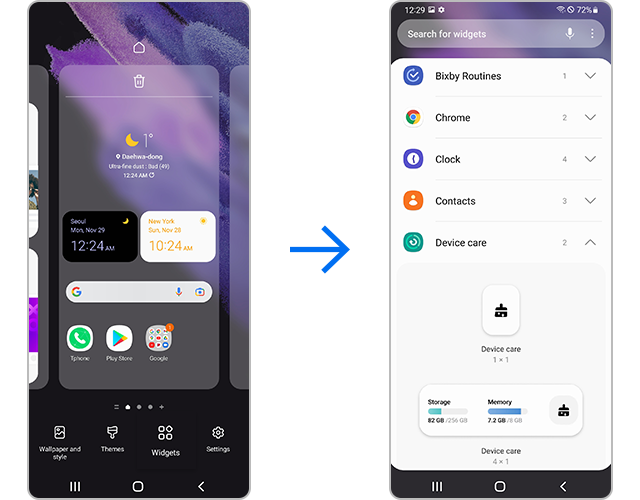
Samsung also brings widgets feature with latest update with which users can Try using the efficient and easily accessible widget feature. You can set widgets for each app and enable the feature.
Camera App :
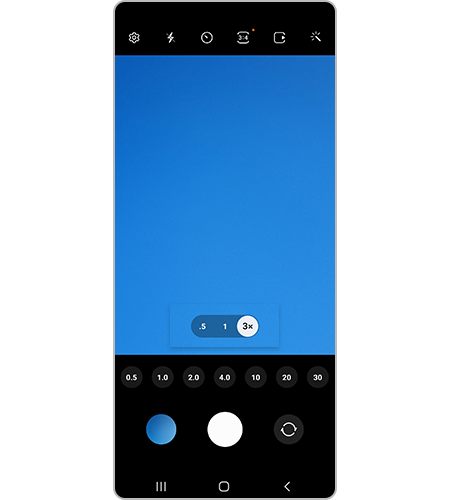
Samsung had bring updated Camera Application with this update the major update in application is The Scene Optimizer button now appears in Photo mode if the ambient light is low or if you are scanning a document. Settings for Portrait Mode and Night mode are now more intuitive. Samsung also has updated settings layout in the Pro Mode. The Pro Mode now feels more organized and has a cleaner look. The Zoom setting display has been changed from icons to numbers for easier understanding of the zoom magnification level.
Privacy :
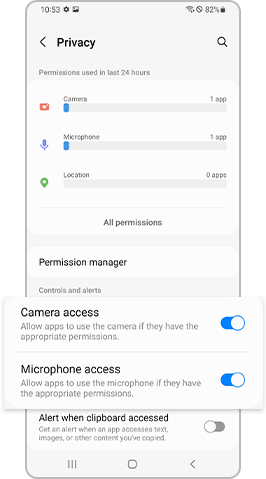
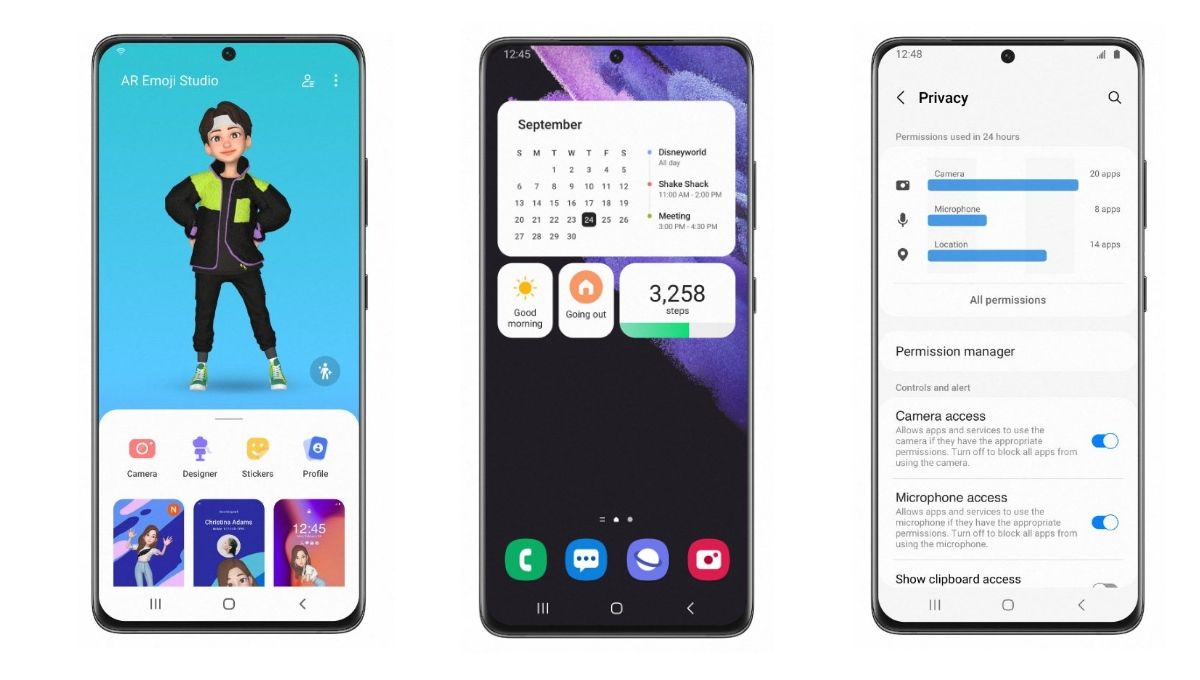
Samsung had updated Android 12's Mic and camera off features and included in the update as well. With a highly strengthened Privacy features, If you activate the Privacy setting, you can check which apps are using the Camera and Microphone in real time. Additionally, you can conveniently see detailed usage logs from the last 24 hours. From Settings, select Privacy, then enable Camera access and Microphone access.
Device Care :
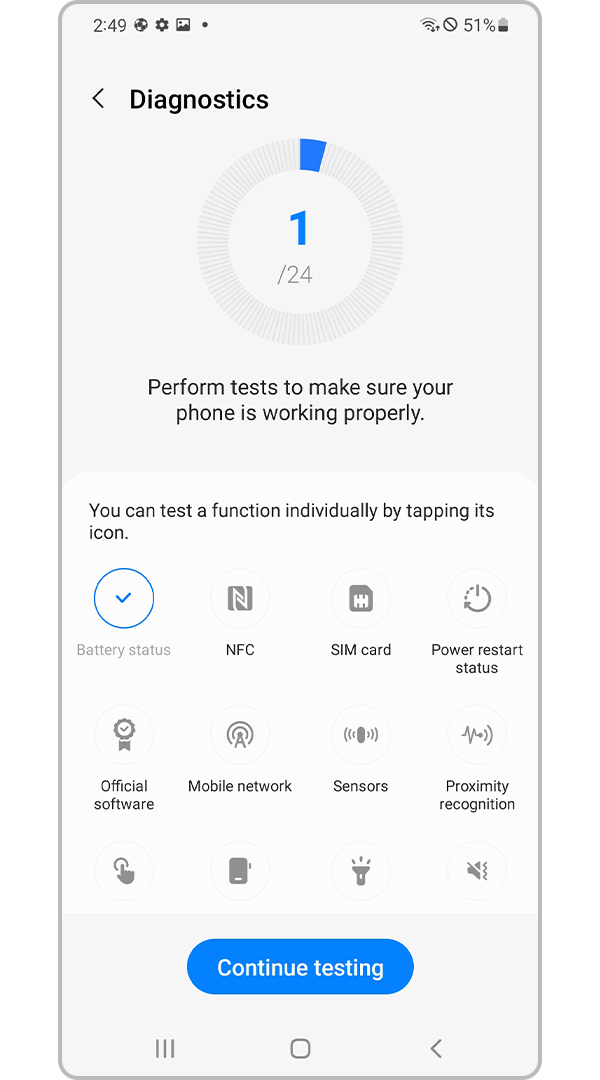
Samsung have developed and update the device care option which lets user check their battery details. Now users can also diagnose their mobile using this option.
Keyboard Function :
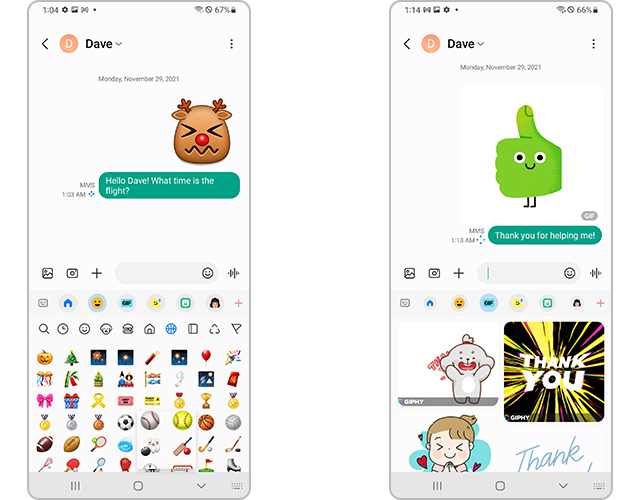
Now you can use wide variety of stickers and emoji's along with GIFs in chats
PIP (Picture in Picture) Mode :
Simply, this is the feature with which you can play a video overlay on your screen with minimized screen it is use since long time, with this update samsung updated this feature to resize and change place of the video on your screen.
Extra Dim :
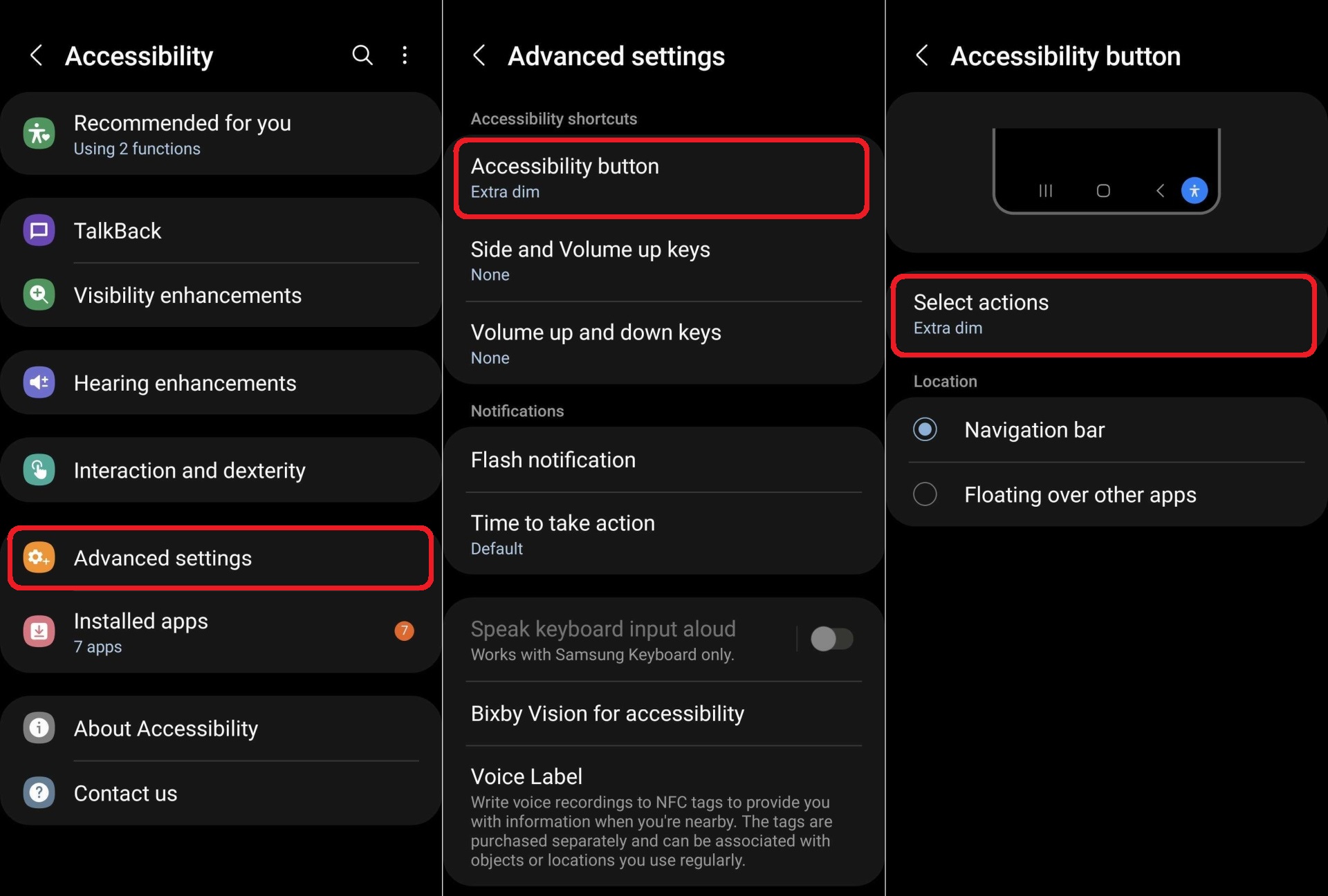
This is the another feature which is introduced in Android 12 and samsung also used the same and added in Accessibility which will reduce screen brightness extra while using the mobile at night times.
These all are the highlighted features of Samsung's One UI 4.0 and there some few features which are small updates here they are :
Lock screen
With latest update you can change the audio output to a different device, like headphones or a speaker, right from the Lock screen.
A new Voice Recorder widget for the Lock screen lets you record voice memos without unlocking your phone.
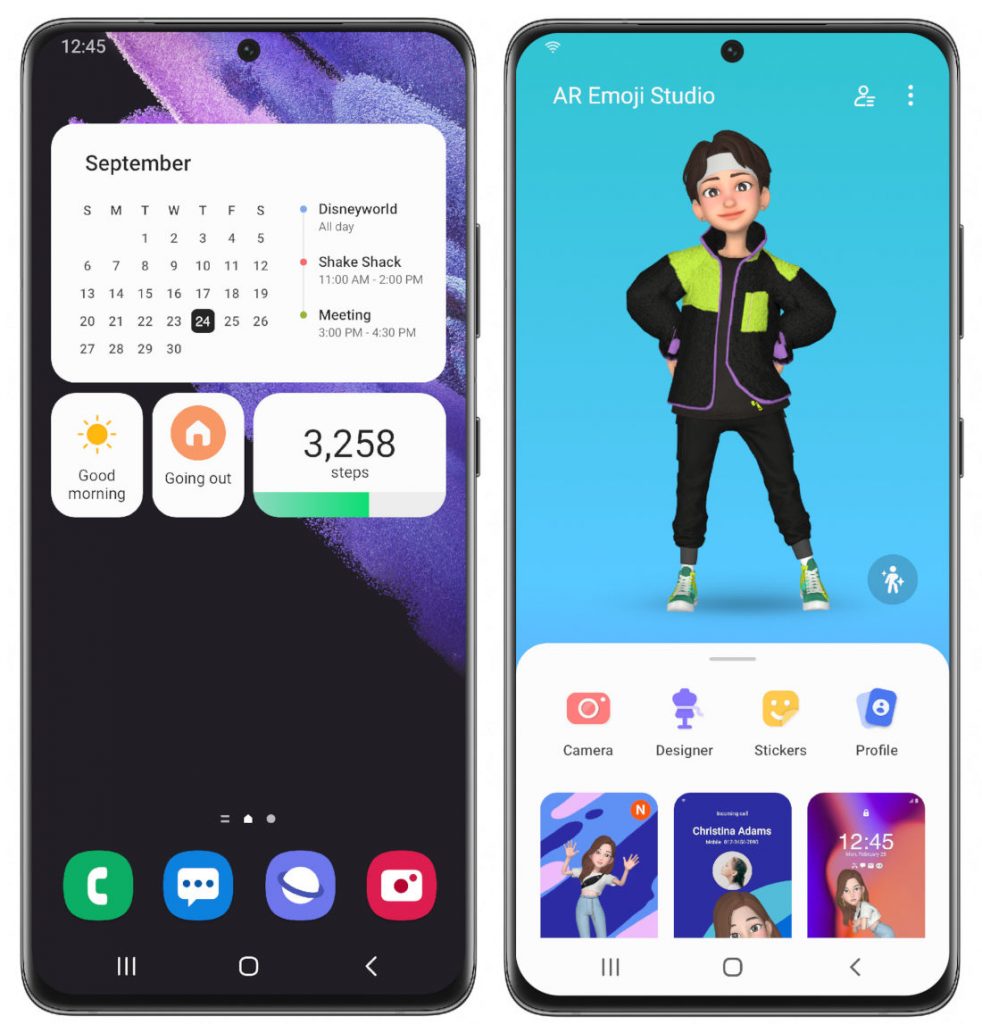
A monthly calendar appears on the Calendar widget to help you keep track of your events from the
Lock screen.
Always On Display
You can set the Always On Display turn on whenever you receive a notification.
New animated stickers are available.

AR Emoji
Now you can use an AR emoji as your profile picture in Contacts and Samsung account. You can choose from over 10 poses or create your own expressions.
Use your own drawings to create unique clothes for your AR emojis.
New AR emoji stickers that show only your face have been added.
Make cool dance videos with your AR emojis. Choose templates as well.

Quick panel
You can manage your notifications more comfortably with an enhanced layout and an integrated section of alert and silent notifications.
The brightness bar in the quick panel is larger so it’s easier to see and adjust.

Settings
Improved search features help you find the settings you need, when you need them. You’ll get
The new Safety and emergency menu lets you manage your emergency contacts and safety information all in one place.
Dark mode
Wallpapers, icons, and illustrations are now darkened automatically to provide a more consistent look and more comfort for your eyes.
Charging effects
New visual effects appear when you start charging to help you check the charging speed.
Tips
Preview videos now appear when you enter the Tips app, helping you learn everything your Galaxy can do.
Sharing
You can customize the list of apps that appear on the share panel to reduce clutter, and scroll left and right across the lists of apps and people for quicker access.
When you try to share pictures that have problems like poor focus or framing, you’ll get suggestions for fixing them so your pictures always look their best.
Camera
Enjoy a simpler, clearer layout with a preview that shows only the information you need. The scene optimizer button will only appear in Photo mode if there’s low light or you’re scanning a document.
Settings for Portrait and Night modes are now more intuitive.
Lens and zoom: See the zoom level on the lens icons for easier zooming, even in modes that only support one lens.
Video that never misses a moment: Recording now starts immediately after you press the Record button, instead of when you release it. In Photo mode, touch and hold the Shutter button to start recording a video. Drag your finger to the Lock icon to continue recording without having to hold down the button.
Single take: Add extra time while recording in Single Take so you don’t miss key moments. After recording is finished, the content selection menu has been improved to help you easily choose the perfect shots.
Pro mode: Settings have been reorganized for a cleaner look. When grid lines are on, horizontal level indicators help you line up the perfect shot.
Enhanced scan features: After scanning a document, you can zoom in for fine editing. When you scan a QR code, you can choose from several options depending on the type of QR code.
Gallery
Stories now show a video preview on the cover and a highlight video inside. You can also see where each picture in a story was taken on a map.
More options are available for sorting albums that contain lots of photos.
Album covers are now shown at the top of the screen when you open albums.
Search suggestions have been improved to help you find pictures and videos. Recent searches are also suggested.
Remastered pictures can be reverted to their original versions at any time, even after they’re saved.
You can now edit the date, time, and location that pictures and videos were taken.
Photo and video editor
Add fun emojis and stickers to your pictures and videos.
Create video collages by combining multiple images and videos from your Gallery.
The new Light balance option lets you edit the tone of pictures more easily.
The Highlight reel editor has also been enhanced to give you even more control.
Revert edited videos back to their original versions at any time, even after they’re saved.
Cut out a face, pet, building, or any other object from a photo and paste it onto a different one.
Multitasking
Pin the window option menu to the top of a pop-up window to make it easier to access.
Easily resize picture-in-picture windows with pinch zoom.
Keep your current app in view while using edge panels. Blurring has been removed to help you see more at once.
Digital Wellbeing
Keep your eyes on the road with the new Driving monitor. You’ll get reports on how much you used your phone and which apps you used.
Clock
The dual clock widget now shows different background colors for each city depending on whether it’s day or night.
Calendar
The new Calendar layout lets you add events instantly. You can also find events more easily with improved search features.
A new Home screen widget shows your monthly calendar along with today’s events.
Create shared calendars and invite other Galaxy users to join.
Messages
Photos, videos, web links, and other content will now appear in search results in the Messages app.
Device Care
The main screen shows battery and security issues, making it easier to solve problems quickly.
Your phone’s overall status is shown as an emoji, helping you check the status at a glance.
Now you can get right to Samsung Members diagnostics from Device Care. If something seems wrong with your phone, try the diagnostic tests to find out what the problem is and get suggestions for solving it.
Bixby Routines
More conditions are available for your routines. Start a routine during a call or when a certain notification arrives.
Make your routines do more. You can now turn on Enhanced processing with a routine. There are also more options for connecting and disconnecting Bluetooth devices.
Reorder actions by touching and holding actions on the edit page. Advanced options have also been added to let you wait before an action starts, confirm actions, and more.
We’ve removed restrictions for some combinations of conditions and actions so you can do even more with your routines.
Create custom icons for your routines using the camera or an image from gallery.
Accessibility
Perform actions more quickly by moving your mouse pointer to one of the 4 corners of the screen.
Adjust contrast and size at the same time with custom Display mode (High contrast or Large display).
Access accessibility features more quickly with a floating button that’s always available.
More visibility options are available to meet your needs. You can reduce transparency and blur or make
the screen extra dim.
Set different colors for each app’s notifications so you can easily determine where notifications are coming from.
Magnifier window has been merged with the new Magnification menu, giving you more options and more control for magnifying content on the screen.
Samsung Health
A new tab layout at the bottom of the screen helps you access the features you need more easily. The new My page tab shows your profile, weekly summary, badges, and personal bests.
For your gender selection, you can now choose “Other” or “Prefer not to say.”
It’s now easier to invite your friends to team challenges by sending a link. Additional snacks have been added to the food tracker.
Privacy
See which apps are accessing sensitive permissions such as Location, Camera, or Microphone in
Permission usage history. You can deny permissions for any apps you don’t feel comfortable with.
A green dot will appear in the upper right corner of the screen when any app is using the camera or microphone so you can see if an app is recording you without your consent. You can also use quick panel controls to temporarily block all apps from using the camera or microphone.
Take more control over apps that want to access your location. For apps that only need to know your general area, such as weather apps, you can allow access to your approximate location so they can’t determine exactly where you are.
Sometimes you need to copy sensitive information, like passwords or credit card numbers, but you don’t want it to fall into the wrong hands. You can choose to be notified any time an app accesses content copied to the clipboard in another app.
My Files
Search features have been improved. You can still find the files you’re looking for, even if there’s a typo.
The Recent files area has been expanded to help you more easily find files you’ve used recently.
Samsung Internet
Get more search suggestions when you enter text in the address bar. Results will appear with an all new design.
The new search widget helps you find what you’re looking for, right from the Home screen.
To protect your privacy, Samsung Internet will automatically start in Secret mode if you were using Secret mode during your last browsing session.



 Posts


